How does the SwimPro system work?
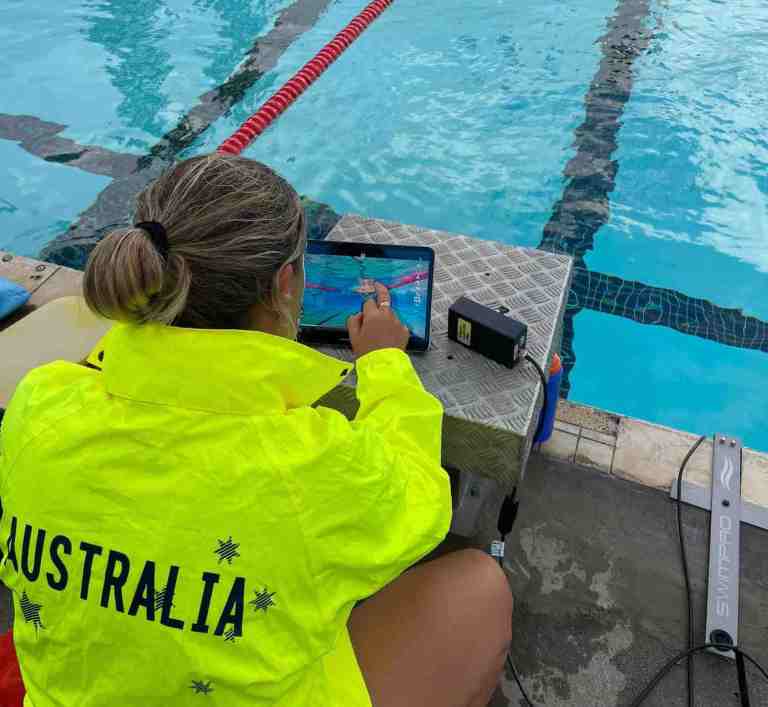
SwimPro is designed for swimming coaches to capture, analyze, and share high-quality video in real-time or later. Here’s how its components work together:
-
Cameras: Six specialized cameras (Platinum Plus, ProX, WallCam, FloorCam, StartCam, ClawCam) capture 2K video at 60fps (or 1080P 60fps selectable for space saving). Built with corrosion-resistant materials (anodized aluminium and stainless steel), they use 10- or 20-meter cables (extendable to 30m/100ft) to maximise reliability or optional wireless modules for fast setup/packup and portability.
-
streamCORE Box Connection: Cameras connect to the streamCORE box via water-resistant IP65 cables (not for submersion) or wirelessly. The box supports up to six cameras and creates a SwimPro Wi-Fi network for video feeds. Multiple iPads can connect at once!
-
streamCORE Box and Wi-Fi: Powered by a USB-C power bank (45W+, 3-4 hours for three cameras) or mains, the splash-proof (IP65) streamCORE box enables wireless iPad connection or cabled via USB-C to Ethernet adapter for reliability in busy environments.
-
SwimPro iPad App: The user-friendly app connects via Wi-Fi or cable, offering Record, Playback, and Multi tabs for capturing, reviewing, and comparing footage. Features include tagging, delayed playback, annotations, and sharing via iOS platforms (e.g., Dropbox). Supports 1-6 cameras and Apple TV integration.
-
Optional iQLab: A mini computer (requires 110V/240V power) connects to the streamCORE box and TV/monitor via HDMI. It displays multiple camera feeds as resizable windows for advanced analysis, with USB or FTP export.
Setup takes under a minute for a three-camera system: unzip travel cases, unroll cables, place cameras, connect to streamCORE, and link iPad. SwimPro delivers real-time multi-angle footage for efficient coaching.
How do I set up the streamCORE system?
Place the streamCORE box near your pool. Plug each camera into the box using the provided cables. These plug into special water-resistant ports on the box. Power the box with the included USB-C power bank, then connect your iPad to see the camera feeds.
What do I need to connect the cameras to the streamCORE box?
You need the cables that come with the system. Plug one end into the camera and the other into the water-resistant ports on the streamCORE box.
How does the iPad connect to the streamCORE box?
Your iPad can connect wirelessly to the streamCORE box’s Wi-Fi (like “SwimPro”). If you want full cable mode, you can plug the iPad into the streamCORE box via a USB-C to ethernet adapter and SwimPro ethernet cable.
Can I add more cameras later?
Yes, you can start with one camera and add more whenever you want, up to six per streamCORE box (add cameras here).
How many cameras can one streamCORE box handle?
One streamCORE box can handle up to six cameras.
What is the iQLab, and how does it work?
The iQLab is an optional small computer that connects to the streamCORE box and your TV or monitor with an HDMI cable. It shows multiple camera feeds on a big screen, using software similar to the iPad app. Simply click on a camera and it shows up on the TV like an iPad. Each camera window you have open is like having an iPad on the TV screen (for example, four camera streams open is for iPad on the TV screen).
How is the streamCORE box powered?
It’s powered by a USB-C power bank that comes with the system, so it’s easy to use poolside.
Does the iQLab need a separate power source?
Yes, the iQLab needs to be plugged into a standard 110V/240V wall outlet.
How long can the camera cables be?
The standard cable is 10 meters (30 feet). You can add extra cables to reach up to 30 meters (100 feet) per camera. (option to add cable lengths can be found under each camera — here)
What comes with the streamCORE system?
You get the streamCORE box, a USB-C power bank, and the cameras you order, each with a 10-meter cable. Extras like wireless modules or the iQLab are sold separately. (option to add wireless modules can be found under each camera — here)
Why choose SwimPro over action cameras for swimming training?
Action cameras, while available at a lower starting price (often half the cost of SwimPro’s $1,500 entry-level package), are not designed for swimming training and coaching. Here’s why SwimPro stands out:
-
Purpose-built for swimming: SwimPro is engineered for the harsh pool environment, with durable materials like stainless steel and carbon fiber that resist chlorine and saltwater corrosion. Action cameras, used five days a week, perish quickly due to inadequate underwater ratings and fragile connectors like rubber grommets.
-
Real-time multi-camera support: SwimPro offers real-time video from multiple cameras (up to six or more), eliminating the need to manage several action cameras independently. Action cameras rely on slow Bluetooth or Wi-Fi downloads, delaying feedback until muscle memory fades. SwimPro delivers instant playback for immediate coaching insights.
-
Analysis and coaching tools: Action cameras lack features like annotation, delayed playback, and integration with advanced analysis software like the iQLab. SwimPro provides a complete solution tailored to swimming workflows.
-
Workflow efficiency: Coaches save countless labor hours with SwimPro’s quick setup, pack-up, and real-time capabilities, compared to the cumbersome process of downloading and reviewing action camera footage.
What are the workflow benefits of using SwimPro?
SwimPro enhances coaching efficiency with:
-
Time savings: Quick setup and pack-up, supported by portable travel storage cases, make it ideal for busy schedules.
-
Real-time feedback: Instant multi-camera video playback eliminates delays, unlike action cameras that require downloading high-data-rate footage.
-
Durability: Built with robust, corrosion-resistant materials, SwimPro withstands daily pool use, while action cameras erode over time.
-
Customization: Adjust video quality (up to 1440p at 60fps, 1080P at 60fps selectable) and data rates (5-30 Mbps) to suit your needs, balancing clarity and storage.
-
Portability: Lightweight yet sturdy, SwimPro is easy to transport and deploy.
How does SwimPro compare to other competitors?
With over 10 years in the market and six product revisions, SwimPro is a leader in swimming training technology:
-
Superior Video Quality: SwimPro captures 2K resolution (2560x1440p) at 60 frames per second, delivering sharper, smoother footage for detailed analysis. Most competitors are limited to 1080p (1920x1080p), which provides less clarity for identifying subtle technique improvements critical for saving milliseconds in performance.
-
Unique Hybrid Reliability: SwimPro is the only hybrid cable and wireless solution in the marketplace. Go wireless for portability and flexibility, or switch to cabled mode for full high-quality reliability, ensuring consistent high-data-rate video (up to 30 Mbps) without interference, even in crowded environments like competitions. Competitors’ wireless-only systems often suffer connectivity issues, lacking SwimPro’s robust cabled backup.
-
Experience and Expertise: Developed with input from federations and Olympic-level coaches, SwimPro meets the needs of clubs at all levels—from local teams to elite performance hubs. Its iterative design ensures refined functionality tailored to swimming workflows.
-
Durability: Built with corrosion-resistant materials like stainless steel, anodized aluminum, and carbon fiber, SwimPro withstands harsh pool environments (chlorine and saltwater). Competitors’ products often fail prematurely due to inadequate waterproofing or fragile components.
-
Value and Scalability: Starting at $1,500 for a camera and streamCORE box, SwimPro offers an accessible entry point with modular expandability (add cameras, iQLab, or wireless modules). Competitors may have lower initial costs but lack SwimPro’s durability, flexibility, and specialized features.
-
Optimization: Every aspect—from cameras to the streamCORE box—is tuned for cost, workflow, and utility, outperforming less specialized alternatives.
Can I expand my SwimPro system over time?
Yes, SwimPro’s modular design allows you to:
-
Add cameras: Start with one camera and scale up to six (or more with custom packages) as your budget and needs grow. (check out the cameras here)
-
Integrate iQLab: Plug into the streamCORE box for full video analysis on TVs, monitors, or large displays.
-
Extend power: Use recommended USB-C PD power banks (45W or higher) for 3-4 hours of use with a three-camera setup, or swap in larger-capacity banks for longer sessions.
What is the cost of a SwimPro system, and are there deals available?
-
Entry-level pricing: A single camera with a StreamCore box starts at $1,500 USD, making it affordable for clubs of all sizes.
-
Deals: Specials on multi-camera packages or bundles are often available—contact SwimPro to explore current offers tailored to your needs.
How does the streamCORE box improve reliability?
The streamCORE box replaces older, costly wireless systems with a hybrid solution that:
-
Maximizes quality: Delivers consistent, high-data-rate video (up to 30 Mbps) without interference, even in crowded environments.
-
Lowers costs: Eliminates expensive wireless infrastructure while maintaining performance.
-
Ensures reliability: Coaches can focus on training, not troubleshooting connectivity. Wireless modules remain an option for specific use cases, like the Platinum Plus telescopic pole camera.
How durable is SwimPro equipment?
SwimPro is built for longevity in pool conditions:
-
Materials: Stainless steel, anodized aluminum, and carbon fiber resist corrosion and wear.
-
Waterproofing: Cameras handle daily submersion.
-
Lifespan: With proper care (rinsing with fresh water and drying after use), cameras last three years or more.
-
Warranty: A 12-month warranty covers manufacturing defects, with free replacements for issues like leaks or cracks.
Can SwimPro integrate with third-party tools or support live streaming?
Yes, SwimPro offers flexibility:
-
Exporting: On the iPad, share videos via the camera roll or cloud services for further analysis or distribution.
-
iQLab: Provides advanced analysis and export options.
-
Live streaming: For all-day events, custom cable extensions (up to 30 meters/100 feet) or tailored solutions are available—contact SwimPro for details.
What doesn’t SwimPro have?
SwimPro is a comprehensive solution:
-
No significant gaps: With durability, workflow efficiency, and high-quality video analysis, it covers all bases for swimming training.
-
Maximized value: At its price point and with current technology, additional features are hard to justify without inflating costs. From real-time multi-camera support to the modular iQLab and streamCORE box, SwimPro delivers everything coaches need.
What cameras are available with SwimPro?
SwimPro offers six standard cameras, each designed for specific use cases in swimming training. All cameras share the same core specifications: 2K (2560×1440 pixels) at 60 frames per second, with data rates up to 30 Mbps (contact SwimPro if higher rates are needed). Clients typically need no more than 15 Mbps for clear images, as higher rates can lead to redundant data and slower transfers when sharing files via email, cloud, or other services. The cameras differ primarily in their attachments and mounting options. Camera packages are customizable combinations of these cameras.
What is the SwimPro Platinum Plus camera?
The SwimPro Platinum Plus is a versatile telescopic pole camera made from lightweight carbon fiber with durable hardened plastic joints. It is retractable and extendable (specific lengths available on the camera’s page on swimpro.com), short enough for easy transport and storage, and long enough to reach good heights in most pools for capturing swimmers. It comes standard with a 20-meter (approximately 60-foot) cable and can be made wireless by adding a wireless module. To switch from cable to wireless, unplug the cable from the pole and plug in the wireless module, then turn it on for a wireless connection to the SwimPro Wi-Fi and iPad.
It includes a clip-on/off wheel attachment for mobility, allowing you to run alongside swimmers. The mount can also attach another SwimPro camera for simultaneous above- and below-water shots in real time. Additionally, it comes with an anodized aluminum wall mount for converting it into a static wall camera, where you can pan for smooth shots. The camera is height- and angle-adjustable. In cabled mode, it can be submerged to the pool floor as a floor camera. For example, attach a 10-meter (30-foot) cable and a wireless module at the end to create a wireless floor camera setup.
What is the SwimPro ProX camera?
The SwimPro ProX camera is identical to the Platinum Plus but without the wheel attachment or the ability to mount a second camera. It is designed as a telescopic pole camera and static wall camera (using the wall mount), with options for pool floor submersion. It is ideal for users who do not need mobile footage like running alongside swimmers. It comes standard with a 20-meter (60-foot) cable and supports wireless modules.
What is the SwimPro WallCam?
The SwimPro WallCam is a static wall camera that is height- and angle-adjustable, sitting over the side or end of the pool wall to capture underwater shots. It comes standard with a 10-meter (30-foot) cable. Like other cameras, it can extend up to 30 meters (100 feet) or more (contact SwimPro for longer options) and supports wireless modules.
What is the SwimPro FloorCam?
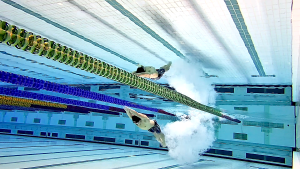
The SwimPro FloorCam is a submersible camera designed to sit on the bottom of the pool floor, providing an Olympic-style angle looking up at the swimmer for underwater symmetry views. It can be placed in the middle of the pool, at the end of lanes, or anywhere underwater. It comes standard with a 10-meter (30-foot) cable and supports wireless modules.
What is the SwimPro StartCam?
The SwimPro StartCam is an above-water tripod camera, ideal for capturing starts or above-water shots while pairing with below-water cameras. The retracted and extended sizes of the tripod are detailed on the camera’s page on swimpro.com. It comes standard with a 10-meter (30-foot) cable and supports wireless modules.
What is the SwimPro ClawCam?
The SwimPro ClawCam is a versatile above- and below-water camera with three legs and a standard SLR-style grip device, allowing it to cling or strap to various surfaces underwater or above water. It can be placed anywhere needed for custom shots. It comes standard with a 10-meter (30-foot) cable and supports wireless modules.
What are the differences between SwimPro cameras?
All six SwimPro cameras use the same core camera technology (2K at 60fps, up to 30 Mbps), but differ in attachments and mounting options for various use cases. Telescopic pole cameras (Platinum Plus and ProX) come with 20-meter cables, while others come with 10-meter cables. All are waterproof and submersible (attachments included), and can add wireless modules or extra cable. For longevity, rinse cameras with fresh water and dry them after each use to prevent corrosion from varying chlorine and salt levels in pools.
What is the wireless range for SwimPro cameras?
Wireless range is environmentally dependent but designed to cover a 50-meter pool if bandwidth is available. Signal strength supports walking around Olympic-sized pools, but data rate depends on bandwidth. In high-density wireless areas (e.g., cities or competitions with many devices), use cables as backup. Wireless modules provide reliable video when Wi-Fi is clear, with cables always available for fallback.
What SwimPro camera packages are available?
SwimPro packages are customizable combinations of cameras, starting with a streamCORE box included in every purchase. You can add wireless modules, extra cables, or the iQLab. Packages are detailed on swimpro.com for current pricing and options.
-
6Cam Package: Includes all six cameras (Platinum Plus, ProX, WallCam, FloorCam, StartCam, ClawCam). Ideal for universities, performance clubs, or elite Olympic-level setups where budget is not an issue. Great for attracting crowds and using multiple iPads for impressive, real-time multi-angle analysis.
-
4Cam Package: Includes Platinum Plus, ProX, WallCam, and FloorCam. Suited for clubs with budgets where price is not a major challenge but don’t need the full kit. Provides mobile shots (roaming with Platinum Plus), static side shots (ProX), incoming swimmer shots (Wall Cam), and floor views.
-
3Cam Package: Includes Platinum Plus, WallCam, and FloorCam. For clubs that can’t afford more but need underwater footage, a roaming above/below-water camera (Platinum Plus), static wall shots, and floor shots. Popular for budget-friendly real-time multi-angle feedback.
-
DualCam Package: Includes ProX and WallCam. For budget-sensitive clubs wanting real-time multi-angle above/below-water shots. Offers flexibility and portability with the telescopic pole (ProX) and static wall camera.
The 3Cam and DualCam packages are most popular for being budget-friendly while providing essential real-time underwater and above/below-water feedback. More cameras allow capturing multiple angles to identify inefficiencies and save milliseconds in performance.
What is the SwimPro app?
The SwimPro app (also called SwimPro 2K) is an iPad app that connects to the SwimPro Wi-Fi network (even in cabled setups via the streamCORE box). It is simple and plug-and-play, designed for coaching workflows. Features include:
-
Tabs: RECORD (for capturing videos like on a phone), PLAYBACK (review past videos with annotations and voiceovers), MULTI (combine live cameras, playbacks, or mixes for comparisons like yesterday’s vs. today’s swim).
-
Fast Switching: A button to quickly switch between states (e.g., from two-camera view to single playback) for efficient coaching.
-
Tagging: Tag swimmer names, strokes, dates, or attributes; tags are added to file names for easy searching across platforms using standard OS tools.
-
Analysis Tools: Draw, annotate, add coaching voiceovers, and perform analytics.
-
Delayed Playback: Adjustable delay (open a camera, set delay, scrub back/forth for real-time analysis at a delay, like chase play).
-
Sharing: Compatible with iOS/Apple third-party platforms like Dropbox, Google Drive, OneDrive, iCloud, Amazon storage, etc.
-
Apple TV Integration: Connect iPad wirelessly (performance-dependent) or via cable for large-screen viewing.
The app supports 1-6 cameras and is basic yet powerful for quick setup and use.
How does the iQLab enhance analysis?
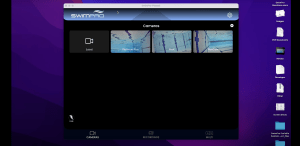
The iQLab is an optional add-on mini computer with SwimPro software. Power it on, connect to the streamCORE box via cable, and access all cameras on a TV, monitor, or large display (via HDMI). Cameras appear as thumbnails at the top; click to open windows (like mini iPads) that can be dragged around. Features include recording, playback, delayed playback, comparisons, and analysis (similar to the app but on a larger screen).
You can open multiples of the same camera (e.g., four windows of one camera) or different cameras. It includes a coaching cam (webcam) for overlay videos, measurements, and detailed technical analysis. Sharing is via USB stick or external hard drive (plug in for high-speed USB 3.0 transfers) or FTP to a local network (contact support for details). It comes with a wireless mouse for precise control and operates like a basic purpose-built OS for SwimPro. The iQLab requires mains power (110V/240V outlet) and cannot be powered by USB-C power banks.
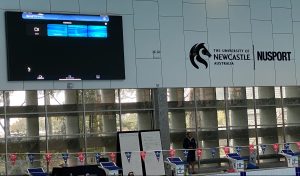
Use it for hands-off coaching (e.g., delayed playback on a TV for swimmers to self-review), advanced office analysis, or creating coaching videos. It’s not mandatory but elevates feedback, especially with a large display on pool deck or in an office. See photos on swimpro.com under iQLab for layout examples.
How reliable is SwimPro in different environments?
SwimPro’s hybrid cable/wireless system ensures reliability. If wireless issues arise (e.g., due to bandwidth in competitions), switch to full cable mode (including cabling the iPad via USB-C to Ethernet adapter). This distinguishes SwimPro from wireless-only competitors, providing consistent underwater video for same-day analysis. The streamCORE box is splash-proof (IP65 with breathers, tested with a garden hose) but not submersible; place it poolside (e.g., near diving blocks) as a trip-free hazard, wipe down after use. It has ventilation for electronics and can be placed close to action for max wireless strength or stored aside.
Cables have IP65 connectors (not recommended for submersion; if submerged, open, rinse with fresh water, dry, e.g., with a hairdryer). Custom SwimPro cables are flexible, easy to unroll, with Velcro ties for quick setup/pack-up.
How long does setup and pack-up take for SwimPro?
SwimPro is designed for quick plug-and-play. For a 3Cam package, setup takes less than 60 seconds if optimized, or no more than a couple of minutes: unzip padded travel storage cases (included with all cameras, streamCORE box, and iQLab), unroll cables, place cameras in water, plug into streamCORE box, power up, and connect iPad. Pack-up is similarly fast with Velcro ties and cases.
How should I decide on purchasing a SwimPro system?
Choosing the right SwimPro system depends on your coaching goals, budget, and operational needs. Here’s a guide to help you make an informed decision:
-
Performance Level and Number of Cameras: For elite programs (e.g., state, national, or Olympic-level), more cameras, like the 6Cam Package, provide multi-angle, real-time analysis to identify inefficiencies and save milliseconds in performance. For budget-conscious clubs or those starting out, begin with fewer cameras, such as the DualCam Package, and expand later as needs grow. Each camera captures 2K video at 60fps for detailed feedback.
-
Budget: SwimPro systems start at $1,500USD for a single camera and streamCORE box, making them accessible for clubs of all sizes. Multi-camera packages and add-ons scale with your budget. Visit swimpro.com for current pricing and package details, including special deals on bundles. Add some cameras to the cart to make your own custom package or select one of our pre-bundled packages to suit your budget needs.
-
Wireless vs. Cable: Opt for a cabled setup for maximum reliability, especially in environments with heavy Wi-Fi interference (e.g., competitions). Add wireless modules for mobility, such as roaming with telescopic pole cameras (e.g., Platinum Plus or ProX), while keeping fixed cameras cabled for a hybrid setup. This flexibility ensures consistent performance.
-
iQLab Addition: Choose the iQLab for large-screen analysis, hands-off swimmer feedback (e.g., delayed playback on a TV), or advanced tools like coaching overlays and measurements. If you prefer mobile coaching, iPads alone are sufficient for poolside use with the SwimPro app.
-
Setup and Workflow: SwimPro’s plug-and-play design minimizes setup time (under 60 seconds for a 3Cam Package). Wireless offers faster mobility, but cables ensure quick, reliable deployment. All systems include padded travel cases and custom cables with Velcro ties for efficient setup and pack-up.
SwimPro is designed to optimize performance for serious swimmers by providing real-time, multi-angle footage to refine technique. For elite setups, combine multi-camera packages with the iQLab and multiple iPads (use cables if bandwidth is limited) to maximize coaching impact. Check swimpro.com for detailed package options and to tailor your system.
How do I purchase a SwimPro system?
Purchasing a SwimPro system is straightforward and flexible to suit your needs:
-
Select Your System: Choose individual cameras (Platinum Plus, ProX, WallCam, FloorCam, StartCam, or ClawCam) or a pre-configured package (e.g., DualCam, 3Cam, 4Cam, or 6Cam) based on your coaching requirements and budget. You can customize combinations by adding cameras, wireless modules, extra cables, or the iQLab. Visit swimpro.com for detailed options and current pricing.
-
Add to Cart: Add your selected cameras, package or iQLab to the shopping cart directly on swimpro.com.
-
Checkout Options: Pay securely online using a credit card for immediate processing. Alternatively, contact SwimPro to request a quote or invoice for your order, ideal for clubs or organizations preferring formal billing.
-
Contact for Customization or Deals: For tailored configurations or to explore special offers on multi-camera bundles, reach out to SwimPro via the contact form on swimpro.com or by direct inquiry. The team can assist with custom setups or provide guidance on the best system for your needs.
All purchases include a streamCORE box, necessary cables (10m or 20m standard, extendable to 30m/100ft), and a USB-C power bank. Check swimpro.com for package details and to start building your system.
How do I choose a SwimPro camera package within my budget?
To find a SwimPro camera combination or package that fits your budget, visit swimpro.com and explore our shopping cart. Add individual cameras or select one of our pre-bundled packages (e.g., DualCam, 3Cam, 4Cam, or 6Cam) to match your budget and performance needs. The best approach is to determine the number of cameras you need and set a clear budget, then adjust your cart to find the ideal combination of cameras and accessories, such as wireless modules or the iQLab, that meets both your financial and coaching requirements.
Contact us direct if you need a hand. We are always happy to chat.
Does SwimPro ship internationally?
Yes, SwimPro ships to all major countries. To get started, add your desired equipment (cameras, streamCORE box, iQLab, or accessories) to the shopping cart on swimpro.com and proceed to checkout. Postage costs will be automatically calculated based on your location and selected items. For countries that typically do not receive airfreight from our shipping partners, DHL or FedEx, contact SwimPro directly to explore alternative shipping options tailored to your needs.
What are the import duties, VAT, tarrifs and taxes for SwimPro in my country?
To determine the import duties and taxes for SwimPro products in your country, we recommend contacting your local customs authority and providing the SwimPro HS code: 85258030. This international classification code is used to calculate applicable duties and taxes. For a rough estimate, you can use websites like SimplyDuty.com by entering the HS code, your country, and the product details to get an approximate calculation of import duties and taxes.
Can I purchase a streamCORE box for my existing SwimPro system?
Yes, if you have an existing SwimPro system, the new streamCORE box is compatible with older 2K SwimPro cameras, allowing seamless integration. In some cases, older 1080p SwimPro cameras may also connect to the streamCORE box, but compatibility depends on the specific version—contact SwimPro to confirm. If your existing 2K cameras use wireless modules, they will wirelessly connect to the streamCORE box. You can also purchase additional cables to create a hybrid cable/wireless system for your 2K cameras. Get in touch with us to verify compatibility and explore options for upgrading your setup.
How much storage do SwimPro videos require?
Video storage depends on resolution and data rate: At 2K (1440p) 60fps with 15 Mbps (recommended for clarity), a 1-minute video uses about 100-150 MB. Adjust rates (5-30 Mbps) to balance quality and file size. Videos are stored on your iPad or iQLab; export via app to cloud services like Dropbox for management. For multi-camera sessions, plan for several GB per hour—use external drives for iQLab backups.
How long does the battery last on the streamCORE box?
The streamCORE box is powered by a USB-C power bank (45W+ recommended, 1 x included with purchase). With a standard bank and a three-camera setup, expect 3-4 hours of runtime for a 2 or 3 camera system, depending on video settings and data rates. For longer sessions, use multiple battery banks (you can swap banks mid-session without interruption. Power Banks are very cheapt at ~$45USD on Amazon) or connect to mains power for all-day operation.
What iPads are compatible with the SwimPro app?
The SwimPro app (SwimPro 2K) is designed for iPads running the latest iOS versions. It works seamlessly with recent models like iPad Air, iPad Pro, or standard iPads with sufficient processing power for multi-camera streaming. For best performance, use iPads with USB-C ports for cabled connections. We reccomend iPad models with larger screens to take advantage of the quality video provided by the SwimPro cameras.
How do I maintain SwimPro equipment for optimal performance?
To ensure durability in pool environments, rinse all cameras, cables, and attachments with fresh water after every session to remove chlorine or saltwater residue. Avoid submerging cable connectors; if they get wet, open them, rinse, and dry (e.g., with a hairdryer). Store in the provided padded travel cases. For the streamCORE box, ensure proper ventilation and wipe down after splashes. Regular maintenance can extend camera lifespan to three years or more (we have Olympic level clients that have been using SwimPro for 6 years at ~4-5 training sessions a week at 4 hours per session — and the cams are still running strong!).
What is the warranty and support for SwimPro products?
SwimPro offers a 12-month warranty on all equipment, covering manufacturing defects such as leaks or cracks, with free replacements provided. Support is available at support@swimpro.com.au.
How long does it take to receive a SwimPro order once placed?
Lead times for SwimPro orders vary based on demand and your location. For the most accurate estimate or an update on your order, please contact our warehouse directly at warehouse@swimmingcam.com. They can provide further details and instructions regarding your order’s delivery timeline.
Can I add more cameras to my streamCORE box in the future?
Yes, the standard streamCORE box is designed for scalability. It can support up to three cabled cameras and an iPad when using a cabled iPad connection. If you opt for a wireless iPad connection, the streamCORE box can handle up to four cabled cameras. Additionally, you can connect a mix of cabled and wireless cameras—for example, three cabled cameras and three wireless cameras. The number of wireless cameras and iPads that can connect depends on available bandwidth.
Does SwimPro work with Android devices, or is it only compatible with Apple iPad?
SwimPro is designed to work exclusively with Apple iPads. This ensures consistent performance with our high-quality 2K cameras, which require robust hardware and software compatibility. Many Android devices, such as low-cost models (e.g., $100 devices from AliExpress), do not meet the performance standards needed for reliable connectivity and video processing with SwimPro’s system.
Do I need to purchase another streamCORE box if I buy additional cameras in the future?
When you purchase your first SwimPro camera or camera package, a streamCORE Box is included. If you buy additional cameras later, you can use the existing streamCORE box, which supports up to three cabled cameras with a cabled iPad connection or four cabled cameras with a wireless iPad connection, plus additional wireless cameras depending on bandwidth. If you need another streamCORE box to expand your setup further, you can purchase one for $790 USD per box.
Does SwimPro have an ongoing subscription fees or any residual payments after purchase?
No, SwimPro requires only a one-time purchase of the equipment. Your upfront payment covers everything needed to unpack, set up, and operate the system, including cameras, streamCORE box, and the SwimPro app. There are no ongoing subscriptions or residual fees.
Why is SwimPro much better than smartphones, action cameras, or competitors in terms of reliability, portability, and setup time?
While it might be tempting to save money by piecing together a budget setup using smartphones, action cameras from sites like AliExpress or Alibaba, or even opting for competitors that claim full wireless reliability, SwimPro stands out as a superior solution designed specifically for swimming coaches and athletes. Clients often don’t fully appreciate this until after 2-3 weeks of regular use (at least 2-3 sessions per week), when the simplicity, portability, and unmatched reliability become second nature.
SwimPro has been engineered with every step of the coaching process in mind, making it near military-grade in durability—it can take the hits of daily poolside use. Setup is effortless: just pull it out at the start of a session, toss it in the water, and it handles everything automatically. This all-in-one kit integrates what would typically require a mishmash of technologies and multiple operators. For instance, imagine trying to run a three-camera real-time underwater streaming system with action cameras or smartphones—you’d need three swimmers equipped with devices, followed by everyone getting out of the pool to coordinate, download, and sync footage. It’s a logistical nightmare that wastes precious time, and by then, the athlete’s motor memory of the swim has faded.
In contrast, SwimPro delivers multi-angle underwater insights in real-time, fast, reliably, and with ultimate portability. You get the video footage you need without the hassle of amalgamating clips, cutting videos, downloading files, transferring data, or troubleshooting tech issues. This minimizes time spent on technology and maximizes focus on coaching and performance gains, like shaving off milliseconds.
Competitors or DIY setups often fall short here. Fully wireless systems sound great when bandwidth is available, but without a reliable backup, sessions can devolve into frustrating tech troubleshooting instead of productive training. SwimPro’s new StreamCore system addresses this head-on with a hybrid approach—wireless convenience backed by cable options for unbreakable reliability, ensuring your video is always captured and ready before the athlete’s hair even dries.
It’s sometimes hard to convey this value without experiencing the pain of alternatives firsthand, like a low-budget, backyard rig of multiple action cameras that lacks real-time coordination. SwimPro eliminates that labor, logistics, and technical complexity, combining everything into one seamless product that empowers you to coach effectively from day one.




 Featured
  Featured
  Featured
  Featured
  Featured
  General
  General
  General
  General
  General
  Featured
  General